SIGNAL CONDITIONER CUSTOMER SUPPORT HUB
Explore tips, tricks, and important information from the experts at CTC to ensure the proper functionality of your CTC SC Series Signal Conditioner.
Installation and Wiring Considerations
Many signal conditioner issues are the result of incorrect wiring or configuration, rather than a hardware failure.
If you are experiencing issues with a signal conditioner installation, please first refer to the CTC troubleshooting guide and product manual for the specific error or symptom:
Common issues include:
- Incorrect power wiring, including dual powering by a power supply as well as the PLC or DCS
- Incorrect sensor input wiring
- Improper grounding or shielding
- Output wiring mismatches
CTC SCD and SCE Enclosures
CTC offers SCD Series and SCE Series enclosures, where signal conditioners are factory‑installed and pre‑wired correctly.
- In these enclosures, the customer is only responsible for installing the sensor input wiring.
- These enclosures are the recommended solution for customers seeking a simplified installation and reduced wiring risk.
Customer-Supplied Enclosures
When a signal conditioner is installed into a customer‑supplied enclosure:
- CTC cannot provide remote support for enclosure wiring.
- Customers must follow the signal conditioner manual to ensure correct wiring practices.
Most signal conditioner problems arise during customized field installations. To troubleshoot, remove the signal conditioner from the setup and power it independently to check its operation. Connect the sensor directly to the terminal blocks. If issues persist in this isolated setup, follow the troubleshooting guide.
Configuration and Application Support
CTC signal conditioners support multiple configurations to accommodate different sensor sensitivities, units, and outputs.
- If you are experiencing issues with a specific configuration, CTC recommends using our Vibration Calculator (hyperlink to vibration calculator) to verify that the selected input parameters are appropriate for your application.
- If issues persist, return the signal conditioner to the ISO (default) configuration:
- If the signal conditioner performs correctly in the ISO configuration, this indicates that the custom configuration is not appropriate for the application.
- ISO Configurations include:
- SC310-G3-2IR341-1
- SC320-G3-2IR341-4GP751-1
- SC310-G3-2IR341-1
- If the signal conditioner performs correctly in the ISO configuration, this indicates that the custom configuration is not appropriate for the application.
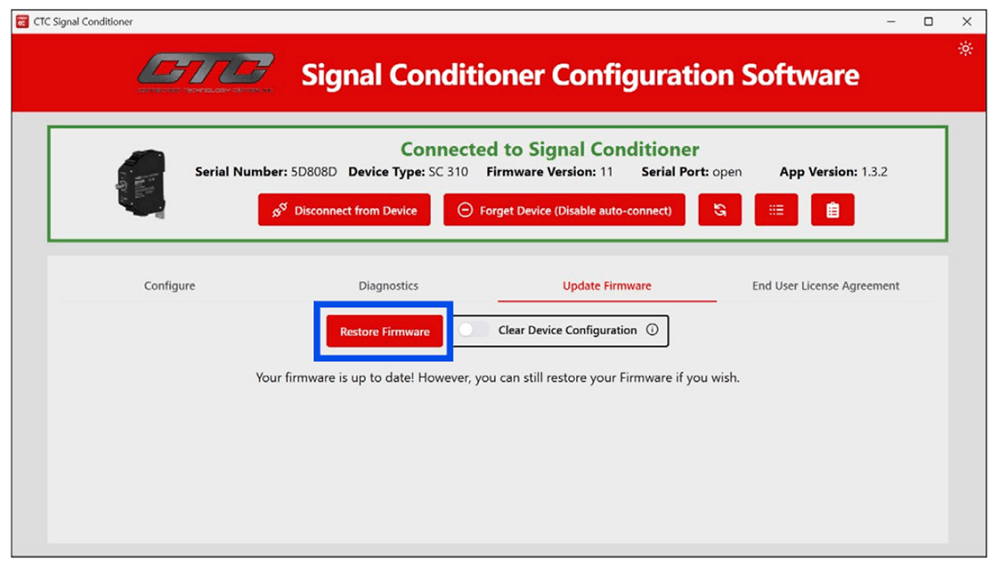
Factory Reset Capability
CTC signal conditioners include the ability to perform a factory reset using the signal conditioner software.
A factory reset:
- Fully wipes the signal conditioner operating system
- Reinstalls the signal conditioner operating system
- Restores the signal conditioner device to a known-good state
Warranty, RMA, and Replacement Policy
Due to the nature of the device, signal conditioners are rarely defective in the field. Most issues are attributed to:
- Wiring errors
- Configuration errors
- Issues caused by incorrect installation
- Software state issues resolvable by factory reset
CTC does not pre‑replace signal conditioners for field issues.
Customers are welcome to return signal conditioners to CTC via RMA for evaluation. Returned units will be tested to confirm proper operation.